Nomen
Renames photos and files in batches, by the day they were taken.
Nomen renames hundreds of files at once and shows every new name before anything changes. Name photos and videos by the day they were taken, keep RAW files with their JPEGs, and undo any rename, even after a restart. Free to use, with Nomen Pro as one purchase. No subscription.
macOS 13 or later · City and country names: an internet connection
IWhat it does
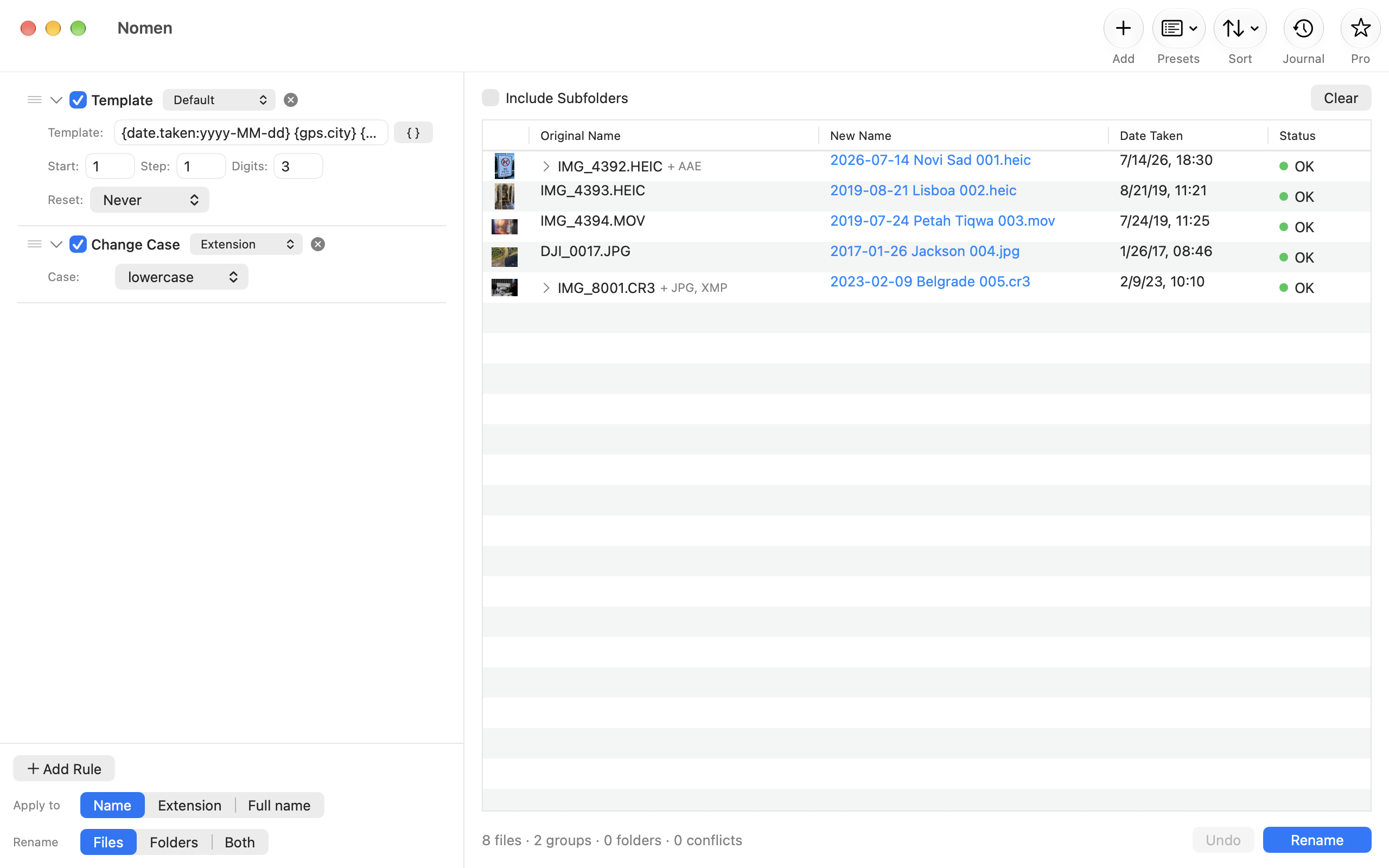
Every new name, before you rename
Old and new names side by side, updated as you edit. Conflicts are found before anything changes on disk.
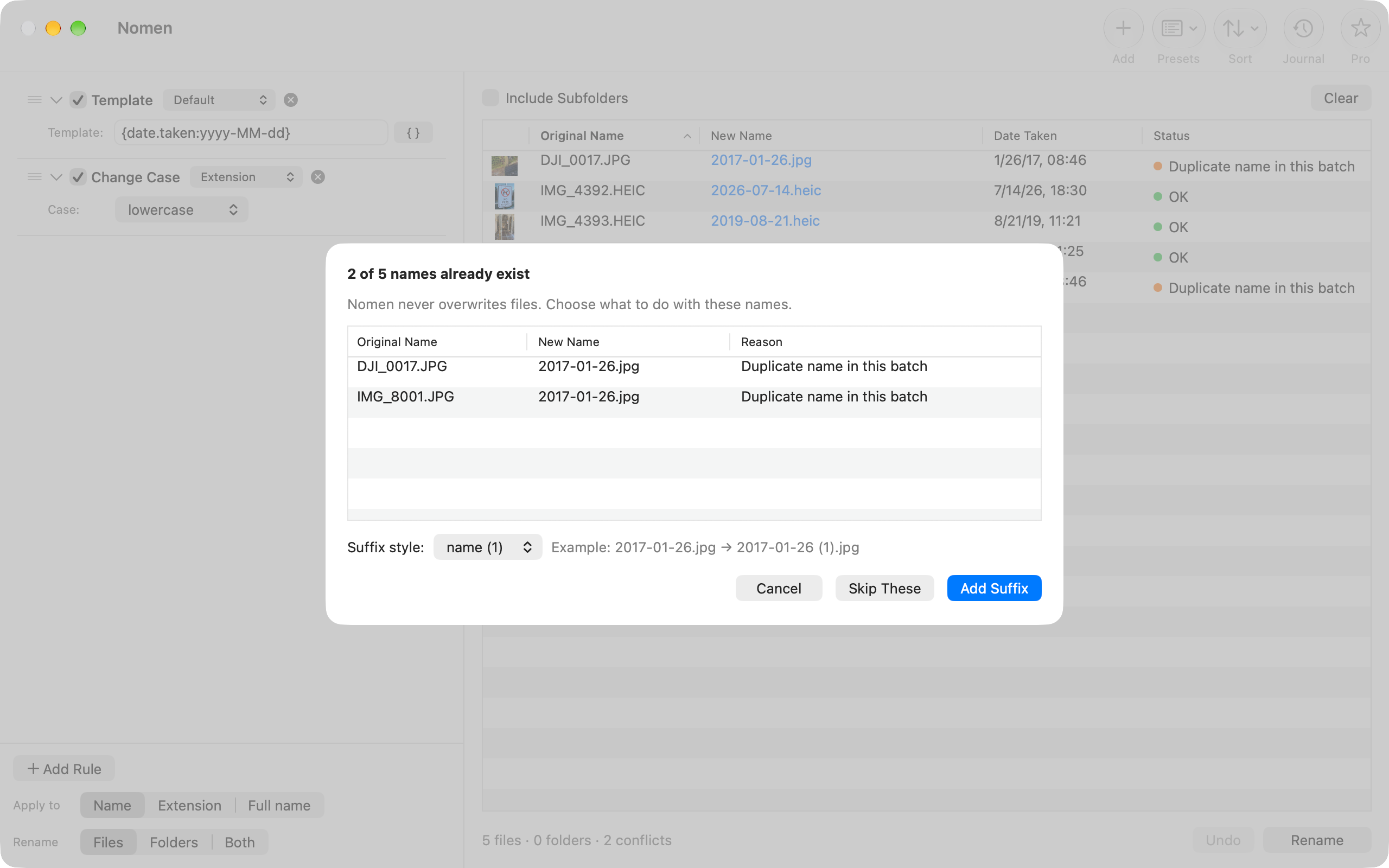
Nothing gets overwritten
Nomen never overwrites or deletes files. When a new name is already taken, it adds a numeric suffix, or you skip those files.
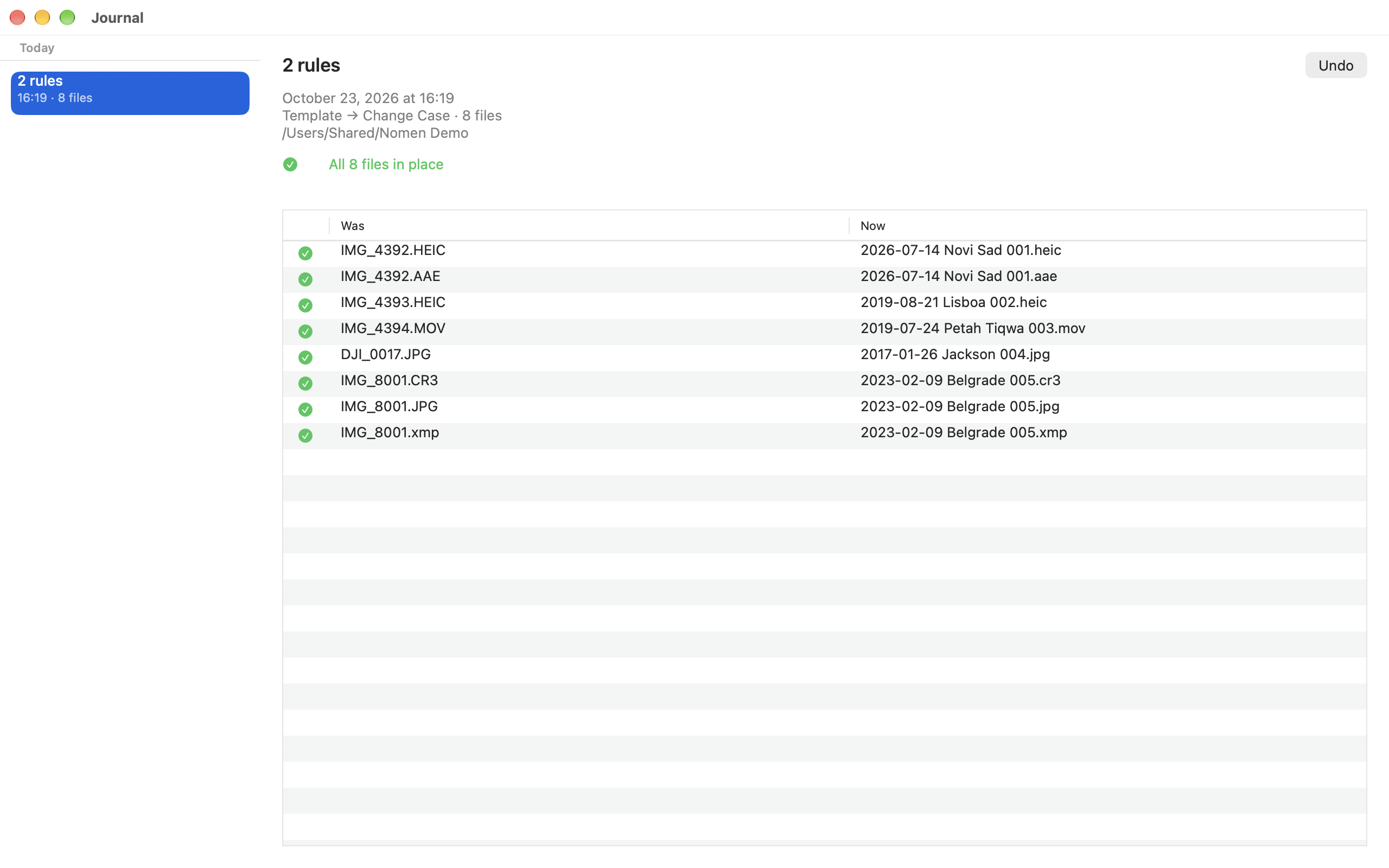
Undo, even after a restart
Every rename goes to the Journal (⌘J) and can be undone there later, as long as the files are still where Nomen left them.
All features
- Every new name, before you rename — Old and new names side by side, updated as you edit. Conflicts are found before anything changes on disk. (Free)
- Nothing gets overwritten — Nomen never overwrites or deletes files. When a new name is already taken, it adds a numeric suffix, or you skip those files. (Free)
- Undo, even after a restart — Every rename goes to the Journal (⌘J) and can be undone there later, as long as the files are still where Nomen left them. (Free)
- Six rules — Find & Replace, Regular Expressions with ready-made patterns, Add Text, Name Template, Change Case and Remove Text, for the name, the extension or both. Title Case leaves iPhone, macOS and HEIC alone. (Free)
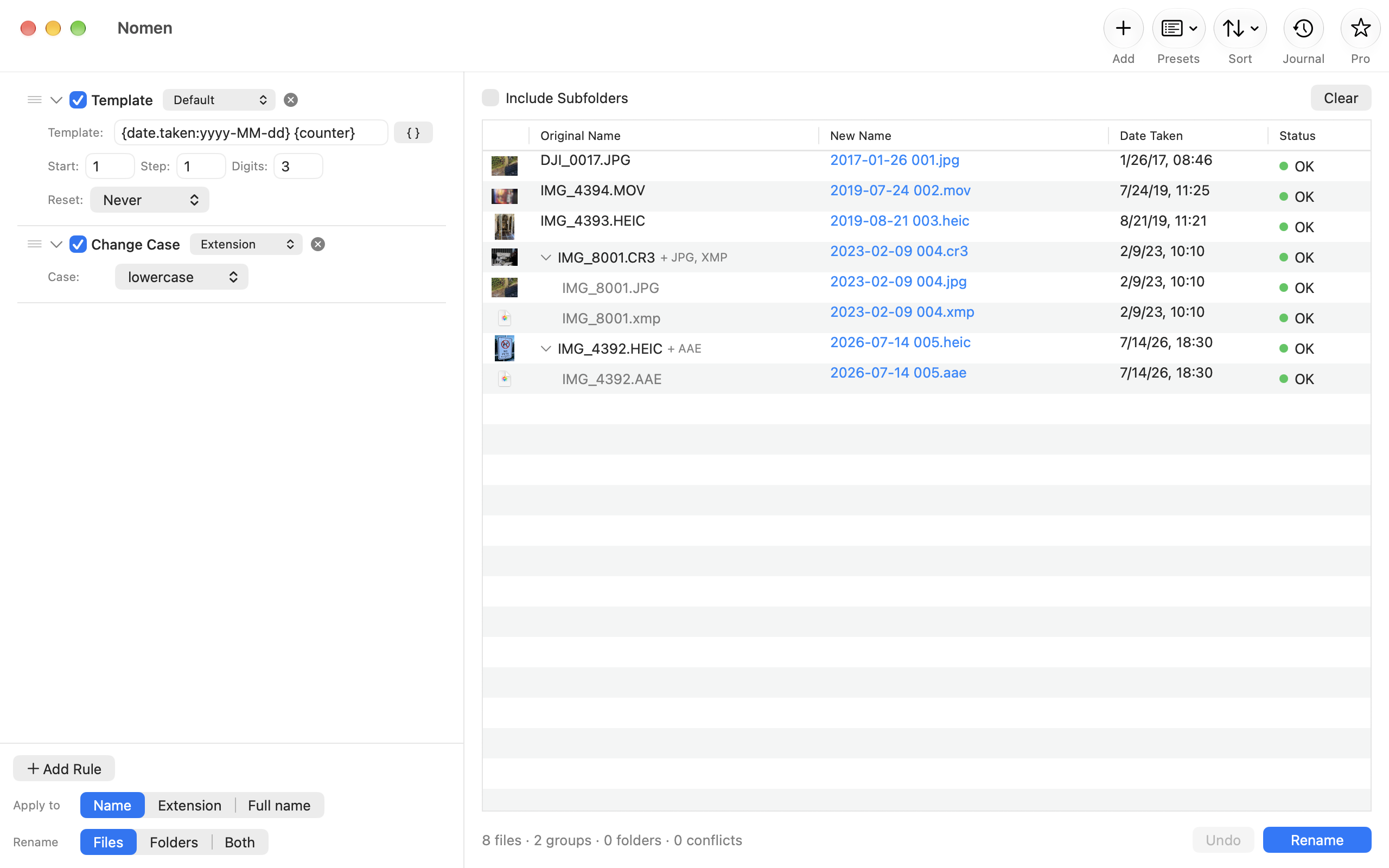
- Counters and natural sorting — Counters anywhere in the name, with start, step and digits, restarting per folder or per day. Files sort 1, 2, 10, not 1, 10, 2, by name, dates, size or extension, or in the order you drag them. (Free)
- RAW, JPEG and sidecars together — A RAW file with its JPEG and XMP or AAE sidecars, or a photo with its Google Takeout JSON, is renamed as one group and keeps one name. (Free)
- Files, folders, subfolders — Rename files, folders or both, with subfolders included when you want them. (Free)
- Rename with Nomen… in Finder — Select files in Finder, right-click and choose Rename with Nomen…: they open in Nomen's window. (Free)
- In seven languages — English, French, German, Japanese, Russian, Simplified Chinese and Spanish. (Free)
- Rule chains — Chain several rules: each one works on the result of the one before. (Pro)
- Date taken, camera and lens — Name photos and videos by the date taken from EXIF and QuickTime, time zones included, and by camera, lens, dimensions and duration. Where a file has no date taken, Nomen uses the file dates and shows where each date came from. Google Takeout photos get theirs from the JSON files. The preview works in Free. (Pro)
- City and country from GPS — Turn IMG_4392.HEIC into 2026-07-14 Novi Sad 001.heic. Place names come from Apple's place-name service, only when a rule asks for them. (Pro)
- Presets — Built-in presets for iPhone, GoPro & drone, Screenshots and Google Takeout. Save your own and share them as .nomenpreset files. (Pro)
- Shortcuts and Quick Actions — The Rename Files action renames with a preset, without opening a window, also as a Finder Quick Action. Preview Rename, which only shows the new names, is free. (Pro)
IICompare versions
Compare the features in each version.
Features in each version of Nomen | FreeEvery basic rule, one at a time, with no limit on files. | ProRule chains, presets, photo and video metadata, Shortcuts. |
|---|
| Rule chains | –Not included | ✓Included |
|---|
| Date taken, camera and lens | –Not included | ✓Included |
|---|
| City and country from GPS | –Not included | ✓Included |
|---|
| Presets | –Not included | ✓Included |
|---|
| Shortcuts and Quick Actions | –Not included | ✓Included |
|---|
| Price | FreeComing soon | See price in appComing soon |
|---|
Pro is an in-app purchase in Nomen, not a separate app. One purchase, no subscription.
IVDetails
- Requires
- macOS 13 or laterCity and country names: an internet connection
- Category
- Utilities
- Price
- FreePro: See the current price in the app
VSupport
What's free and what needs Pro?
Free has every basic rule, one at a time, with the preview, sorting, folders, the Journal and Undo, and Rename with Nomen… in Finder. There is no limit on the number of files. Nomen Pro, a one-time in-app purchase, adds rule chains, presets, renaming by date taken, camera, lens and place, and renaming from Shortcuts and Quick Actions.
How do I undo a rename?
Open the Journal with ⌘J, pick the rename and click Undo. This works after a restart too, as long as the files haven't been moved or renamed since.
Why does Nomen ask for access to a folder?
macOS lets an app rename files only in folders you have allowed. Nomen asks when you click Rename, names the folder, and remembers your answer for it.
Rename with Nomen… isn't in my Finder menu.
Look under Quick Actions or Services in the right-click menu. If it isn't there, turn it on in System Settings → Keyboard → Keyboard Shortcuts → Services → Files and Folders.
I bought Pro on another Mac. How do I get it here?
Click Pro in the toolbar, then Restore Purchases, signed in with the Apple Account you bought it with.
Something else?
Write to [email protected]. Include your macOS version and what you were doing when the problem appeared.
Nomen
Renames photos and files in batches, by the day they were taken.
Follow development or ask about release plans: Contact the studio.